
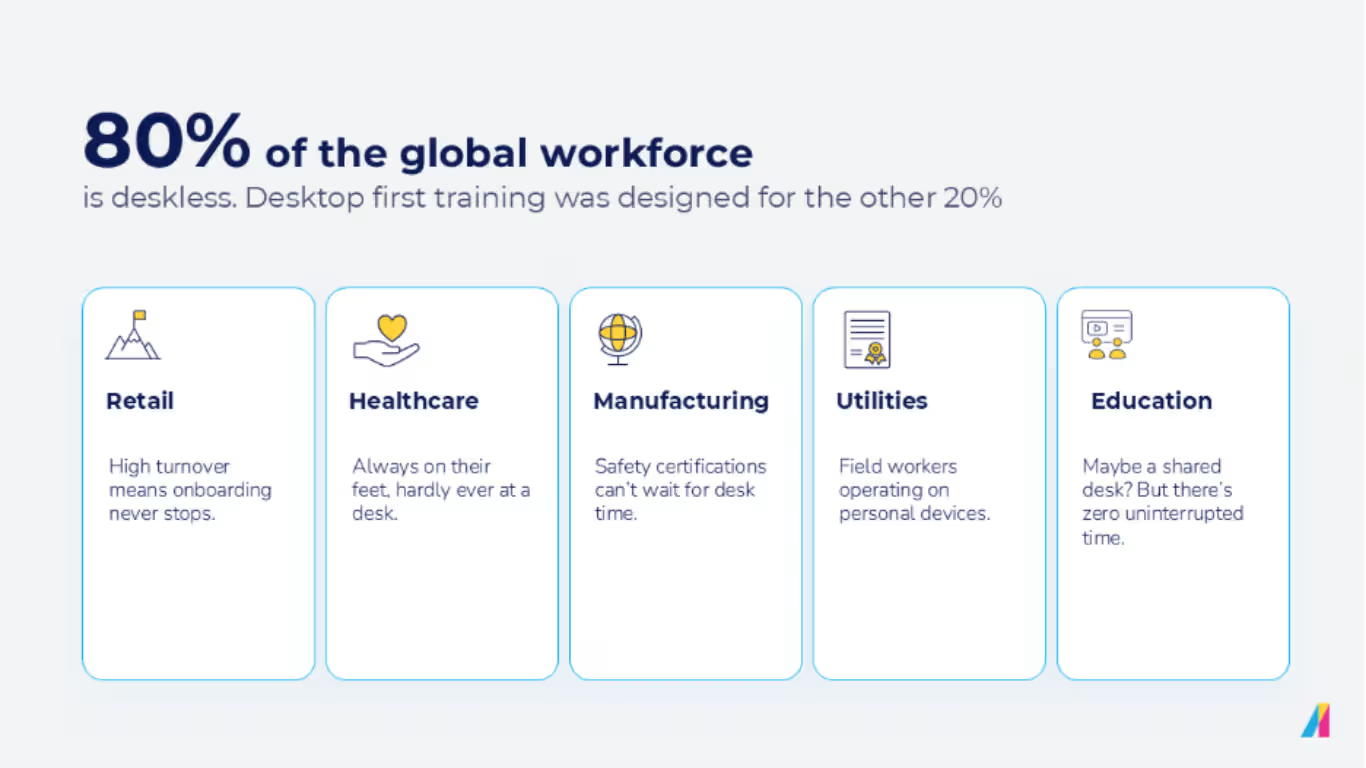
Most training platforms are optimized for workdays that don't exist anymore. Roughly 80% of the global workforce is deskless and even among desk-based employees, uninterrupted focus time is rare. Yet almost every training program assumes they do. Absorb built for the reality a lot of platforms don’t acknowledge — real humans with real work days.
Here’s a slice of training reality:
A compliance notification lands at 9am. Nurses mid-shift snooze that ping — they’re checking on patients. At lunch, the notification gets opened by a few hospital employees (in the cafeteria, on their phone). They start a training session but they're called away for an emergency. By 3:30 pm, some employees get desk time. When they re-open the course, their progress is gone, and the module wants to restart. But there’s no restart, just frustrated abandonment.
Many employees live a two-device day — interacting with a desktop computer and also a mobile phone. Their training is built for one device so it may not get completed when conditions aren't ideal.
Mobile learning doesn’t break in theory. It breaks under real conditions.
Mobile learning often fails because systems don’t respect the demands and conditions of the people they’re supposed to serve. Connectivity drops, sessions fragment, devices change mid-course. Those are default workdays, not edge cases. When offline capability is partial or sync requires manual intervention, progress is lost, data fragments, and completion becomes a guess.
Most LMS platforms support mobile. Far fewer support finishing and that’s where compliance risk creeps in.
Microsoft's 2025 Work Trend Index found that 80% of global employees lack the time or energy to do their best work — and every interruption forces a context switch that increases cognitive load and error risk in detail-oriented tasks like compliance training. Interruptions force resets and increase the risk of non-completion.
Access without proof of completion is a liability that shows up in the same places, across different industries, every time.
Device switching disrupts training completion
A warehouse supervisor starts a safety certification on her laptop before a meeting. She gets pulled away. At break, she opens her phone to finish. But it’s a different interface, and her progress is gone.
Restart vs. quit is a quick decision and quit usually wins. For shift-based teams, momentum slows or dies. The result? Deadlines that slip. At that point, you’re bringing in someone else’s time, too, because a manager has to chase completions.
Inconsistent progress tracking undermines compliance
A field service tech successfully finishes an electrical safety module on his phone between job sites. The system marks it incomplete. His manager pings him the next morning to do it again.
The record didn't catch what actually happened because often mobile and desktop tracking aren’t unified. So, someone chases work that's already done. Multiply that by a few hundred technicians and there’s a lot of wasted time. Not to mention that the compliance dashboard becomes a guess. Audits don't reward guesses.
This isn’t a learner experience problem, it’s a structural problem that wastes time and increases anxiety.
"Mobile-friendly" isn't the same as completing training on mobile
A travel nurse opens an HIPAA refresher on his phone before a shift. The video plays. The quiz won't submit. He tries twice, gives up, and makes a note to do it on a "real computer" later.
Of course, later doesn't come. The layout was fine but the workflow failed. And the org has no idea because on paper, she opened it.
Many platforms ignore critical distinctions. Mobile-friendly means the layout scales. Mobile learning means the workflow finishes.
A healthcare worker, hospitality employee, or anyone on the frontline or in the field opens a required assessment on their phone, hits a wall, closes the app, and adds it to the list of things to deal with later. That list doesn’t normally shrink.
Across everything, the pattern is consistent. When completion can’t be trusted, the data can’t be trusted, and your program integrity crumbles.
How Absorb removed the failure points that stop mobile training from completing
Absorb removed the friction and failure points that stop people from finishing their training.
A single, consistent learner experience across devices
Desktop, mobile web, and mobile app run on one foundation with the same navigation, the same structure, and the same place for everything. The experience doesn't change between screens, so the mental energy that used to go toward reorienting goes back to the content.
Training continues offline with full progress intact without any intervention. When devices reconnect, sync is automatic. A global header keeps navigation consistent across every surface. Dashboard tiles show what's next, what's in progress, and what's recommended, so learners never need to hunt. Tasks and e-signatures mean compliance-critical workflows can be completed end-to-end on a phone.
Assigned training that can be completed where it's started
Required learning — compliance, onboarding, certifications — can be completed end-to-end on mobile which is especially great for workers in retail, healthcare workers, in a warehouse, or onsite technicians — employees who aren’t consistently at a desk. Progress carries cleanly between sessions and between devices, so a course started on a phone at the bus stop finishes on a laptop at the desk without missing a beat.
Learners can stop making decisions about where to finish training. They can just finish it and know it’s been documented.
Learning designed for real work conditions
A quiet, uninterrupted hour on a single, stationary machine was never a realistic prerequisite. The mobile learning experience in Absorb is built around the shape of a real work day for the majority: short windows, interruptions, and variable connectivity. The platform holds the place. The learner only has to think about the content.
Where this makes the biggest difference
When mobile training fails, it lands on the people with the least time to recover. 70–80% of global workers don't have a desk. Of course, there are a lot of different roles and different rhythms for deskless workers, but all of them need a mobile-friendly LMS — training that works where the work happens. Onboarding is where it shows up first.
Employee onboarding
Your new hires can complete their training on whatever device(s) they have, without losing progress between sessions.
The first week in a new job or position can be cognitively dense. Names, processes, culture, expectations all land at once. Required training is one more thing in the queue, and momentum in week one is fragile.
Mobile learning for employees starts on day one and it’s often best integrated into the day-to-day. An employee might need an answer to a question on the phone during orientation, on a laptop between on-site meetings, or even on a tablet at home in the evening. Progress needs to carry through all of it, and organizations should get clean visibility into pre-boarding and day-one completion.
Compliance and recertification
Your completion data reflects reality, no matter which device(s) your employee used to finish.
Compliance training has zero tolerance for ambiguity, and the people responsible for it have even less. When training fails, it does so under audit. If data fragments across devices (or if it goes missing), you’ll be doing damage control.
Unlike mobile-friendly compliance training that only scales the layout, when tracking holds steady across devices, completion data reflects reality whether the learner finished on a laptop or through the mobile learning app. The downstream effect is cleaner audit records, fewer last-minute scrambles before recertification deadlines, and compliance teams who can trust their own reports. Your business needs data documented — and defensible.
Frontline and distributed teams
Training gets completed in the conditions that frontline and field workers are in, with short time windows, personal devices, and no desk.
Frontline and field workers live the two-device day, by definition. Mobile learning must meet employees where they are — on a personal phone, between shifts, in a break room, at a job site. A sales rep starts a certification between calls on their phone. They pick it up on a laptop before a pipeline review. Their progress must carry through to completion.
Frontline training programs need to be less dependent on location for consistent completion records.
Extended enterprise training
Training scales cleanly across regions, languages, and devices.
Extended enterprise training comes with an added layer of complexity — partners, contractors, and external learners don’t all operate inside your environment and they’re not all working in the same language, region, or device context. Mismatches show up as incomplete courses, confused learners, and inconsistent data. When the mobile experience is working well, your organization can stop absorbing the noise — fewer "it didn't work on my phone" escalations, fewer support tickets, and better completion reporting at scale.
A learning experience that works the same way everywhere, regardless of device, location, or language, removes hidden complexities.
Case study: Suncor Energy + Absorb — training in the flow of real work
“Even a small, agile team can deliver outsized impact when equipped with the right tools… making learning more accessible, engaging, and aligned with real-world challenges.”— Tobias Ma, Learning Advisor, Suncor Energy
A distributed, frontline-heavy workforce needed training that was engaging and usable in the flow of work. With Absorb, they achieved:
- 300% increase in course completions
- ~50% boost in engagement
- 4.8/5 rating with 97% positive feedback
- Lower costs and reduced operational risk
What this update is — and what it isn't
This update applies across the full learner experience because when desktop and mobile run on different systems, progress breaks. Absorb runs them on a single foundation, so progress doesn't reset, duplicate, or disappear when a device changes. The focus is deliberately on the learner side. Admin workflows stay desktop-first.
The capabilities you already use now hold up offline, mid-shift, and across devices. The core change is a foundation that proves completion across devices, offline, at scale without anyone having to manually verify whether it happened.
The takeaway for L&D and HR leaders
For onboarding, compliance, and frontline programs, the two-device day is already the reality — learners are completing training on phones and tablets whether the platform handles it well or not.
If completion matters, platform design is the system deciding whether training works. When the platform holds up, learners finish and move on. When teams trust the data, they spend their energy on the programs instead of on the platform underneath them.
The best platform experience is the one that learners don't think about. They open the course and finish it. When an audit lands, the data reflects reality. When training is working right, it’s clean, complete, and doesn’t require chasing.
Frequently asked questions
Is this a fully featured mobile admin experience?
No — and that's intentional. Admin work in Absorb stays desktop-first. Course management, reporting, configurations, and bulk actions belong on desktop, where that level of work is better suited. This update is focused on the learner side, improving the workflows that determine whether training gets completed and tracked.
What can frontline managers do from mobile?
Managers can view team progress, track completion status, and handle time-sensitive actions like approvals and enrollment confirmations from mobile. It's enough to stay informed and unblock learners in the flow of a shift — but it’s not a replacement for desktop when deeper admin work is needed.
Can learners complete required compliance training entirely on mobile?
Yes. Compliance modules, certifications, onboarding sequences, tasks, and e-signatures can all be completed end-to-end — on the app or mobile web. Progress carries between sessions and devices. A learner who starts on a laptop picks up where they left off on a phone.
How is this different from a "mobile-friendly" LMS?
A mobile-friendly LMS fits the layout to the screen. This goes further in that needed workflows — assessments, certifications, progress tracking — get complete on mobile the same way they do on desktop. The difference shows up in the data because completion is tracked consistently regardless of which device finished the job.
Can learners switch languages from the app?
Yes. Learners can switch languages directly in the app without admin intervention or account changes. For extended enterprise programs where learners aren't all working in the same language or region, that removes a friction point that typically surfaces as incomplete courses and support tickets.
Does this affect how desktop learners experience the platform?
Desktop, mobile web, and mobile app now run on one foundation with the same navigation, structure, and behavior. Desktop learners get the same consistency mobile learners do, and workflows aren’t disrupted.
Which programs benefit most?
The most benefits will be for employees where training completion is mandatory, and learners are mobile by necessity — like onboarding, compliance and recertification, frontline and shift-based training, extended enterprise. (Basically, anywhere a desk can't be assumed.)
Is this a new app or a new product?
It's a structural update to the existing Absorb learner experience. The capabilities already in place now hold up consistently — offline, across devices, without manual intervention to sync.
.avif)