Your first ten customers got a great onboarding experience, because a CSM sat with each of them, screen-shared the setup, and answered every "wait, where's the button for that" in real time. It worked so well that customer 11 expected the same thing. So did customer 47. So does customer 212, who is joining a call this afternoon to learn the exact same admin setup steps that have now been explained, live, more than two hundred times.
This all happened one good onboarding call at a time, until the calendar became the bottleneck and the CSM became a very expensive search function for information that should already exist somewhere searchable.
The fix isn't to cancel the calls and email everyone a PDF. That swings too far the other way, and customers can tell the difference between "supported" and "abandoned to a knowledge base" almost instantly. The fix is figuring out, deliberately, which training moments need a human in the room and which ones have just been defaulting to a human because nobody built the alternative yet.
This article gives you that sorting logic. We're going to map where customers get stuck, then walk through a four-door framework for deciding what goes where, before turning that decision into something you can build.
Why 1:1 training breaks as you grow
Before the framework, it helps to name exactly why the model you're running now is the problem — not the effort your CSMs are putting in.
Your CSMs are likely very good at their jobs. So if your customer education is broken, it’s probably because they simply don't have the capacity to scale. Here are some of the signs you need a scalable solution.
They repeat the same basic walkthroughs. Admin setup, feature navigation, the "here's where everything lives" tour — these calls are valuable the first time a CSM gives them and roughly identical the two-hundredth time. Every hour spent re-explaining the product nav is an hour not spent on the account that's showing churn risk.
Customers get stuck after the call ends, not during it. The onboarding call usually goes fine, but the real trouble shows up a week later. Maybe the admin forgot a setup step, a new team member joined and missed the whole orientation, or a workflow that worked in the demo broke in production. If the only fix is "book another call," training is still trapped on a calendar — and now it's trapped on a calendar with a queue.
Quality drifts. Different CSMs explain things differently. Some skip steps under time pressure. Some have a script, but some are improvising. That variety is what happens when training quality depends on whoever happens to be free at 2pm.
None of this means live onboarding is bad. It's valuable. But it can’t be the only answer to every repeatable question, or it collapses under its own popularity.
That capacity problem is why this article doesn't open with a tools recommendation. When practitioners were asked what most enabled their programs to scale, dedicated team capacity and CS partnership tied for the top spot at 36% each. Scalable tech ranked near the bottom of the list — 20%, eighth out of ten enablers surveyed. The fix below leans operations in a specific order. Sort the moments, build the muscle and the CS handoffs first, and let the platform be the thing that executes the plan, not the plan itself.
Map the journey before you build anything
So if the answer isn't more live calls — but also isn't just "ship an academy" — the starting point is figuring out exactly where the gaps are. That means mapping first.
The instinct, once leadership agrees something needs to scale, is to immediately build a customer academy. We’re going to skip that instinct for a minute. Building scaled training before you know where customers get stuck might mean you've automated the wrong things faster.
Start with three questions instead:
Which milestones matter?
Purchase, kickoff, first login, admin setup, first real workflow, team rollout, renewal. Not every milestone needs training wrapped around it — but the ones where customers stall deserve a closer look.
Where do customers repeatedly get stuck?
Support tickets, repeated CSM questions, training drop-off points, and the notes your CSMs keep typing into Slack instead of a system — that's your map. If the same setup step generates the same confused message every single time, it’s a design problem wearing a customer's name.
Do all your customers need the same thing?
An enterprise account with three admins and a procurement department does not have the same onboarding needs as a five-person startup that just wants to get moving. Segment before you scale, or you'll build one training experience that's too heavy for some customers and too light for others.
Milestone | Customer need | Stuck point and scalable fix |
Admin setup | Configure account correctly | Stuck: skipped or misordered steps Fix: guided checklist with progress tracking |
First workflow | Get a real task done in-product | Stuck: confusion between demo and reality Fix: short task-based walkthrough |
Team rollout | Onboard new users without re-running kickoff | Stuck: new hires missing context Fix: on-demand learning path |
Renewal window | Confidence the team is using it well | Stuck: no visibility into adoption gaps Fix: usage-triggered nudge or refresher |
Churn risk concentrates at expansion, renewal, and feature walls. That's data-backed permission to build training for the moments leadership loses sleep over, not just the kickoff call. If your map only covers the first thirty days, you're mapping the part of the journey that was already going fabulously.
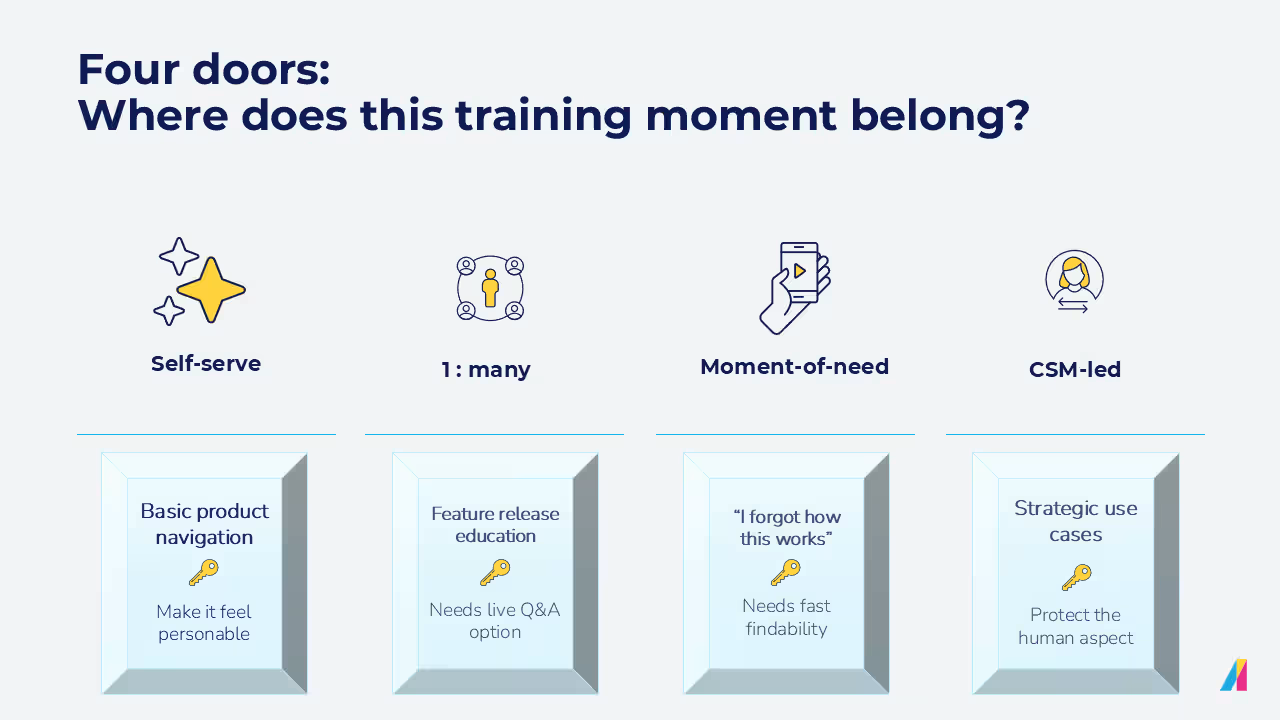
The four doors: where does this training moment belong?
Once you know where customers stall, you can sort those moments deliberately. Every training situation fits through one of four doors — and the sorting is the strategy.
This is the decision framework. Every piece of customer training — existing or imagined — fits through one of four doors. You don’t necessarily need to build all four! Instead, correctly sort what you already have (and what you keep getting asked) into the right one.
Door 1: Self-serve. Repeatable, stable, low-judgment content. Basic navigation, "how do I find X," setup steps that don't vary by account. If a hundred customers would all get the identical answer, it belongs here — as a short video, an article, or a guided checklist, not a 45-minute call.
Door 2: 1 : many. Live or recorded, but built for a room, not a single account. Feature releases, group onboarding for a cohort that started the same week, office hours where multiple customers can ask questions in one sitting. You keep the human warmth without booking one human per customer.
Door 3: Moment-of-need. The "I forgot how this works" door. This isn't a course anyone sits down and completes — it's a searchable answer or in-app nudge that shows up exactly when someone's stuck, three weeks after onboarding, at 4pm on a Thursday. If the same question keeps showing up here, that's a signal that a faster answer isn’t the key. Rather, the underlying content (or the product flow) needs fixing,
Door 4: CSM-led. Reserved for what requires human judgment: strategic use-case planning, adoption-risk conversations, complex enterprise configurations, anything that depends on knowing the specific account. This is the door you protect, not the one you shrink with automation.
That protection argument has a data point behind it. CS recommendation is the single most reliable driver of learner participation — the top pick for 23% of programs, ahead of email, in-app prompts, or anything automated. It's also the factor that most separates high-return programs from low-return ones: 33% of high-return programs point to CS recommendation as their top driver, versus 19% of low-return programs. Door 4 is where they earn the credibility that makes their referral into doors 1 through 3 work.
Training moment | Best door | Why + what to watch for |
Basic product navigation | Self-serve | Why? Repeatable, low judgment Watch for: Keep content short and findable — length kills self-serve adoption |
First onboarding orientation | 1:many | Why? Efficient, still has a human moment Watch for: Don't remove human context for high-touch customers too early |
Admin setup | Self-serve + optional CSM support | Why? Mostly repeatable, occasional exception Watch for: Complex enterprise configurations may need escalation |
Strategic use-case planning | CSM-led | Why? Needs account context and judgment Watch for: Don't force into generic content |
Feature release education | 1:many + on-demand recording | Why? Broad audience, same message Watch for: Make recordings searchable and easy to revisit |
"I forgot how this works" | Moment-of-need | Why? Happens post-onboarding, needs speed Watch for: If the same question repeats, fix the content or the product flow |
Adoption-risk conversation | CSM-led | Why? Requires relationship and timing Watch for: Use data to trigger the conversation earlier |
New customer-side team member | Self-serve / on-demand | Why? Avoids re-running kickoff per person Watch for: Make access simple for external learners |
Run your own training list through this table. You'll probably find half of what's eating CSM calendars belongs behind door 1 or door 3, and almost none of it belongs behind door 4 — which is exactly the point. Door 4 should feel a little exclusive. If everything ends up there, nothing scaled.
Building the system behind the doors
“Building customer education programs that people actually seek out comes down to shifting from training as a requirement to training as a resource. Your content has to be current, your structure has to make it easy to find what you need in the moment, and customers need to feel like they’re progressing, not just consuming content. When you get that right, they come back because it’s helping them solve real problems, not because someone told them to.” — Laura Malloch, Manager, Customer Enablement
Here's what the system behind each door looks like in practice. Once you know what goes where, the tactics you've probably already heard of — academy, webinars, knowledge base, automation — stop being a grab bag and start being a system with a job description.
- A self-serve academy for door 1. Structured courses, short videos, checklists, role-based paths. The goal is findability. A customer should be able to locate the answer to "how do I set up SSO" in under a minute. Quality, not quantity should be the sign on this door.
- 1 : many formats for door 2. Live cohort onboarding, webinars, recorded sessions, office hours. These let you deliver a human moment to a room instead of a single account — same warmth, but a fraction of the calendar cost.
- Automated nudges connecting doors 1 through 3. CRM-triggered enrollment when a customer hits a milestone. Reminder emails when a course stalls halfway. Segment-based paths so an enterprise admin and an end user aren't getting the same email. This turns a content library into a smart system that reaches people at the right moment.
Keeping the system current is the part that's easiest to skip...but it’s also the single biggest differentiator in the data: 60% of high-return programs continuously refresh their content, versus 31% of low-return programs — a 29-point gap, wider than any other factor measured. A self-serve academy full of screenshots from two releases ago erodes trust faster than having no academy at all. Whoever owns door 1 needs a standing job, not a launch date.
A note on what's coming next. As learning platforms get smarter, moment-of-need support is looking less like a search bar and more like a guide that can answer a specific question in the flow of work — grounded in your training content, not guessing. That's a meaningful shift for door 3 specifically. It's worth watching. It is not, today, a reason to skip building the other three doors properly.
Component | What it does | CSM capacity benefit |
Self-serve academy | Houses repeatable, searchable training | Removes repeat walkthroughs from the calendar |
1 : many live/recorded sessions | Delivers human context at group scale | One session replaces dozens of identical calls |
Automated enrollment & nudges | Triggers the right content at the right milestone | Removes manual follow-up from CSM to-do lists |
In-app or moment-of-need guidance | Answers post-onboarding questions on the spot | Reduces "quick question" tickets and calls |
Use the data to fix the journey, not just to report on it
The system is built. Now the question is whether it's working — and that's where most teams stop too early.
Most teams build the academy, watch the completion numbers tick up, and call it done. Like the first article in this series discussed, completion is the easiest number to pull and the least useful one to act on. It tells you people showed up, but not that anything got better.
The more useful question is what the data reveals about where the journey itself is broken.
Signal | What it may mean | Next action |
High drop-off at one module | The step (or the product flow it covers) is confusing | Rebuild that section, don't just resend it |
Repeated "how do I" tickets on the same topic | The content exists but isn't being found, or doesn't answer the real question | Move it to moment-of-need, rewrite for searchability |
Low attendance at live onboarding | The format or timing doesn't fit the audience | Test a different cadence or an on-demand alternative |
High rewatch rate on one video | Something in that step is genuinely hard | Don't just measure it — go fix the underlying confusion |
Completing training but not activating the feature | The course taught the click, not the value | Tie training to an actual in-product action, not a quiz |
What happens when a customer goes quiet altogether? One in six programs — 16% — has no strategy at all for re-engaging inactive learners. That's a serious gap, and the fix isn't automation — CS personal outreach drives re-engagement more reliably than automated reminders do. Add "customer ghosted everything" as its own signal, and route it through door 4, not door 3 — a CSM reaching out beats another email nobody opens.
If seventy percent of customers stall at the same setup module, it's usually a sign that the module, or the product step underneath it, needs to change. Training data is most useful as a diagnostic tool, not a scoreboard — and it's the natural next conversation once you've got the delivery model sorted, which is exactly what our [guide to customer education KPIs] digs into.
Scale should protect the relationship, not replace it
Your goal should never ever be to get customers to stop contacting you. But CSM time is worth protecting. Some parts of training don't need a CSM. And if you can have scalable systems taking care of those moments, it means there’s time left for the parts that do need the human — the adoption-risk conversation, the account-specific advice, the moment a customer needs someone who knows their specific situation, not a generic answer.
Sort what you have into the four doors. Build the system behind whichever door is currently the most overcrowded. Then use what the data tells you to keep improving the journey, not just to prove it happened.
Once the delivery model is working, the next question is whether it's moving the numbers leadership cares about — which is what we cover in Beyond completion rates: the customer education KPIs that prove business impact.